Animated Go to Definition can make it easy to use Go to Definition by double-clicking and show both the definition code and the code it calls side by side using panes. A part of the name “Animated” comes from the animation of inserting a new pane with the definition code.
Go to Definition can make code search easier, so we should use it more frequently. Animated Go to Definition can improve the frequency. If we use it several times while reading code, it lets us step through the code as if we were using a debugger.
If we use it again in the definition code inserted by Animated Go to Definition, the original code, the definition code, and the next definition code are displayed on screen. These codes compose a stack trace because they are a part of a function call chain. Tracing a function call chain is the way to understand how the software works. Animated Go to Definition can help you understand code in such a way.
How to use Animated Go to Definition #
First, add a new folder to the tree view (sidebar) on the left. You can use the “+” button on top of the tree view or the “add Folder…” submenu in the “File” menu. Animated Go to Definition supports the functions or methods in the tree that you add as the root folder. It takes time to enable Animated Go to Definition. Please wait a moment. It depends on the code base you add.
Now, Animated Go to Definition supports JavaScript, TypeScript, Python, Java, and C#. Supported languages will increase incrementally. Welcome to your request.
After the preparation above, double-click a function or method name, and a new pane containing the definition code is inserted. If a cursor is on a function or method name, you can also use it by the context menu or the “Go to Definition” submenu in the “Find” menu.
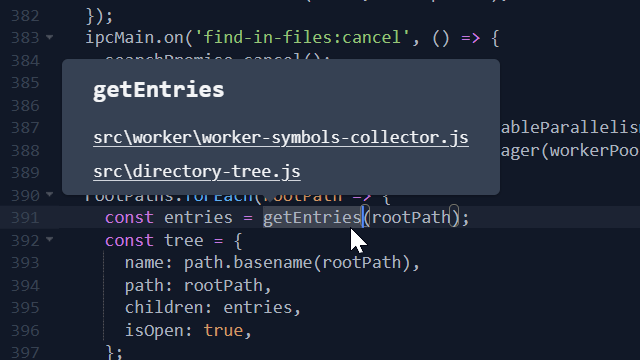
If there are duplicate names in the tree, a tooltip appears showing alternative file paths. When one of them is clicked, Animated Go to Definition works properly.
Animated Go to Definition is designed to help you read code in accordance with a code-reading principle. The principle is to trace a function call chain. It helps you understand, especially, the software’s control flows. It also helps you build a mental model of what the software is and how it works. We hope you feel better before using this feature.